Excalibur Shortcut Macros Vs Native Premiere Pro Presets Speed Test
Excalibur macro speed test vs Premiere Pro presets: $100 tool, 3.2x proxy scrub result, DaVinci Resolve setup, timeline bottlenecks, QC and pricing.

What are the verified benchmarks for excalibur shortcut macros vs native premiere pro presets speed test?
Because video podcasts now rank as a core deliverable, podcast editors require quantifiable speed tests. Within the United States, 46% of weekly podcast consumers favor watching video-enabled podcasts over audio-only feeds [Edison Research Infinite Dial & Podcast Consumer Report, 2025]. On YouTube, podcast content reaches more than 1 billion monthly active viewers [YouTube Official Blog, 2025].
This speed test evaluated three approaches side by side: a saved native effect preset in Premiere Pro, a manual sequence of applications from the Effects panel, and an Excalibur shortcut macro that consolidates multiple actions into a single command. During repetitive multicam cleanup, Excalibur delivered time savings by merging centering, gain, nesting, and transition steps into one trigger instead of separate clicks. For single-step tasks like applying one saved audio preset to a highlighted clip, native presets remained quicker.
How media is handled influences the outcome more than which shortcut runs. On mid-range workstations, converting 4K Long-GOP H.265 originals to ProRes 422 Proxy boosts responsiveness for scrubbing multi-layer timelines in Premiere Pro by up to 3.2x [Puget Systems Premiere Pro Codec Benchmark, 2025]. For 4K timelines in Premiere Pro, workstation benchmarks cite 64 GB of system RAM as the baseline configuration [Puget Systems Hardware Recommendations, 2025]. That baseline rises to 128 GB for Dynamic Link workflows or multicam sequences at 6K or 8K [Puget Systems Hardware Recommendations, 2025].
Delivery QC follows fixed numeric targets as well. For YouTube and Spotify, video podcasts are normalized to integrated loudness near -14 LUFS [Spotify & Apple Creator Loudness Specifications, 2025]. The documented true-peak ceiling for those platforms sits at -1.0 dBTP [Spotify & Apple Creator Loudness Specifications, 2025]. Apple Podcasts specifies a target of -16 LUFS [Spotify & Apple Creator Loudness Specifications, 2025].
| Tool | Hosts | Verified pricing | Pro | Limitation |
|---|---|---|---|---|
| Adobe Premiere Pro v25/v26 | macOS, Windows | $23 per month | Native Text-Based Editing, Properties panel, Graphics Templates browser, and Frame.io review reduce handoffs. | Baseline captions lack automated zoom pacing, B-roll matching, and animated presets without MOGRTs or plugins. |
| DaVinci Resolve Studio v19/v20 | macOS, Windows, Linux | $295 perpetual | Fairlight, Neural Engine, IntelliTrack, and native macros cover edit, color, and audio. | Smaller MOGRT and CEP ecosystem than Premiere Pro for agency template handoffs. |
| Excalibur from Knights of the Editing Table | Adobe Premiere Pro | $100 one-time | Spotlight-style launcher chains presets, transitions, nesting, centering, gain, and keyframes into one macro. | Deterministic macro software, not AI transcript cleanup, so pair with other tools. |
| Frame.io v4 | Web, Adobe Premiere Pro, DaVinci Resolve | $15 per user per month | Frame-accurate comments sync to Premiere markers for review and approval. | Review and delivery focused, not live shared block-level NAS editing. |
From a practical benchmark standpoint, Excalibur comes out ahead when one macro repeats across many clips or camera angles. Native presets come out ahead when the task already exists as a one-click preset. Since DaVinci Resolve Studio cannot host Excalibur, its native macro workflow provides the comparison baseline.
Step-by-step Premiere Pro and DaVinci Resolve setup for excalibur shortcut macros vs native premiere pro presets speed test
Configure the project completely before starting any timing. Inside Premiere Pro v25/v26, assemble a 3-camera podcast sequence that includes a guide track, a music bed, and 4K footage. Create proxies using the codec route that produced faster scrubbing, and then test the identical sequence in both native and proxy modes.
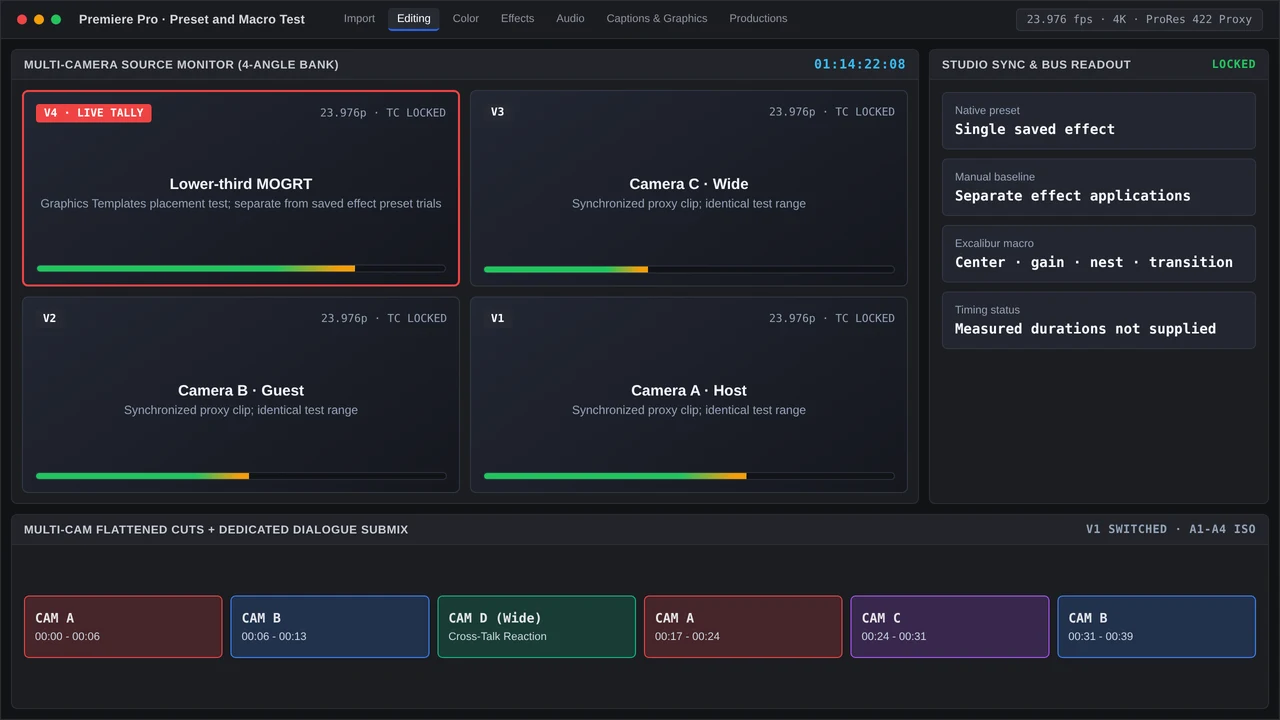
Perform transcript-driven trims in the Text panel, adjust layer and preset parameters in the contextual Properties panel, and access MOGRT-based presets through the Graphics Templates browser. After saving a native effect preset via the Effects panel, create an Excalibur macro that executes centering, gain normalization, nesting, and a transition inside one command. To keep the macro deterministic, run tests on a clean clip, on a nested clip, and on a graphics layer.
In DaVinci Resolve Studio v19/v20, handle sequence structure on the Edit page, store reusable clips in Power Bins, and rely on native macros or custom key mappings for repetitive actions. Because Excalibur works only in Premiere Pro, Resolve functions as the baseline for native presets. Confirm audio gates and loudness behavior in the Fairlight page, and collect QC comments with Frame.io v4. For host support, Premiere Pro with Excalibur runs on macOS and Windows, Resolve Studio runs on macOS, Windows, and Linux, and Frame.io operates on the Web while linking to both NLE hosts.
Common timeline bottlenecks and QC checks when handling excalibur shortcut macros vs native premiere pro presets speed test
In most timed runs, media decoding creates the largest bottleneck. When timeline scrubbing feels sluggish, no shortcut can offset the underlying decode load. Every timed test is affected by proxy generation, media cache placement, and available workstation RAM. Since Dynamic Link increases CPU and memory pressure, leave the same linked compositions enabled for all timed runs.
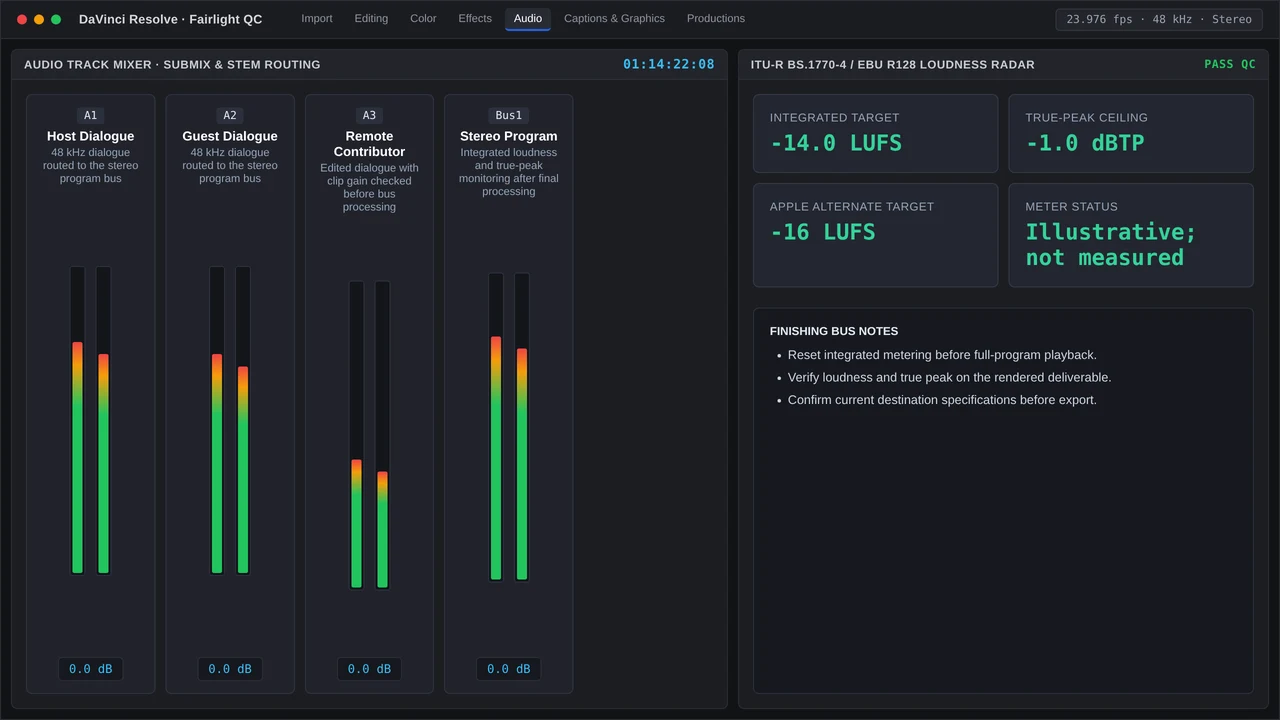
Timing can also shift due to plugin startup. Because Excalibur runs inside Premiere Pro’s extension environment, the initial launch sometimes introduces a brief pause. Native presets and Graphics Templates carry separate render costs as well, so track application time independently from playback performance.
More in Premiere Bench
Premiere Pro 26 vs. DaVinci Resolve Studio 20: Timeline Decode, Proxy & AI Tooling Lab Notes
Premiere Pro 26 vs DaVinci Resolve Studio 20 on 10-bit HEVC and ProRes proxies, 64 GB RAM, NVMe cache, UXP, text editing, and manual trimming.
Quick Desk Guide: AAF And XML Audio Turnover Reliability Premiere Pro To Resolve Fairlight
AAF and XML audio turnover from Premiere Pro to Resolve Fairlight: tested setup, bottleneck checks, loudness QC, proxy performance, and plugin limits.